
Introduction
Many people assume wealth management software is mainly a dashboard for watching investments. For high-net-worth individuals, it can do much more: bring scattered financial information together, clarify decisions, and help you coordinate with family members and advisers. The right platform won’t make financial choices for you, but it can make your full picture easier to understand.
This guide shows you how to assess wealth management software for high net worth individuals, compare practical features, and plan a careful setup. You’ll look at investment tracking, private assets, cash flow, estate planning, and security. The goal is to choose a platform that supports your decisions without making your financial life harder to manage.
Before you begin: Gather a list of your main accounts and holdings, note who needs access, and identify the decisions you want the software to support. You might want a clearer view of your investments, better household reporting, or a way to organize estate documents. Keep your priorities specific; they’ll help you separate useful features from a long list of extras.
Key Takeaways
- Build a reliable consolidated view: Combine connected accounts with manual records to organize net worth, investments, cash flow, and planning information. Label estimates and check when account data was last refreshed, since figures can differ in accuracy and freshness.
- Check coverage for your actual assets: Confirm the platform supports the investments and institutions you use, and can record private assets or property that may need manual updates. Track ownership, debt, estimated value, and review dates.
- Use reports to inform decisions, not predict outcomes: Review performance across periods and suitable benchmarks, while checking how fees, deposits, withdrawals, and changing valuations affect results. Treat risk tools and forecasts as prompts for discussion, not guarantees.
- Use planning tools alongside professional advice: Software can organize cash flow, tax questions, estate documents, and family priorities, but it does not replace qualified tax or legal advice or update the legal status of stored documents.
- Choose for security, access, and usability: Compare platforms against your needs, including account coverage, export options, support, costs, and user permissions. Protect sign-ins, limit each user’s access, and test a few representative accounts before committing.
How Wealth Management Software for High Net Worth Individuals Works

Wealth management software gathers financial information from connected accounts, manual records, or both. It organizes that information into views such as net worth, investment holdings, cash flow, and planning records. Some platforms are designed for individuals, while others support advisers, private banks, or family offices. Check whether a tool is built for your needs before relying on its reports.
A Consolidated View of Complex Finances
A consolidated view can help you see how accounts relate to one another. For example, investment accounts may show market values, while a manually entered property record shows an estimated value and related debt. These figures can help you discuss your overall position, but they aren’t all equally current or precise. Label estimates clearly and check when connected account data last refreshed.
Tools for Individuals, Families, and Advisers
Some tools focus on personal planning, including retirement projections and net-worth tracking, while others help advisers coordinate reports and documents. A family may need shared views for household planning but separate access for individual accounts. Make a list of who will use the software and what each person needs to see. For general investment education, Investor.gov’s guide to asset allocation and diversification can help you frame questions for an adviser.
Core Features for Managing a High-Net-Worth Portfolio

Start with the features that help you understand holdings, performance, and risk. A polished interface matters less than accurate, usable information. Ask how the platform handles different asset types and whether its reports explain what’s included and what’s missing.
Portfolio Tracking Across Asset Classes
Look for support for the investments you actually own, such as stocks, bonds, funds, and cash. If you hold private investments or other less liquid assets, check whether the platform can record them manually and show when their values were last updated. Compare how the software treats cost basis, ownership, and currency. For complex or restricted investments, use the platform as an organizing tool, not a substitute for specialist advice; FINRA’s private placement information offers background on questions investors may need to ask.
Performance Reporting and Risk Analysis
Useful reports show more than a single return figure. Check whether you can view results over different periods, compare them with a suitable benchmark, and see how much of the portfolio sits in each asset class. Ask how the platform handles deposits, withdrawals, fees, and changing valuations, since these can affect what a return means. Treat risk tools as prompts for discussion, not predictions of future results.
Integrating Investments, Banking, and Private Assets

A platform becomes more helpful when it brings together the accounts and property that shape your financial decisions. Before connecting anything, review which institutions it supports and how it handles assets that don’t update automatically. A missing account can make a consolidated report look more complete than it is.
Connecting Financial Institutions and Custodians
Check whether connections are direct, supported through a data provider, or based on file uploads. Find out how often balances refresh and what happens when a connection fails. Keep a short list of connected accounts, update dates, and any records you enter by hand. If you download statements to fill gaps, store them securely and remove outdated copies when you no longer need them.
Tracking Real Estate, Business Interests, and Other Holdings
Real estate, closely held businesses, collectibles, and private funds may need manual records or periodic updates. For each holding, record the owner, a reasonable value estimate, related debt, and the date of the latest review. Separate an estimated value from a readily available cash balance; the two serve different purposes. Notes about valuation sources can also help you and your advisers spot stale figures before using a report.
Planning for Taxes, Estate Transfer, and Family Goals

Planning tools can help you connect investment decisions with expected expenses, tax questions, and family priorities. They can organize information and show possible scenarios, but they don’t replace advice from a qualified tax or legal professional. Use reports to prepare clear questions and share relevant records with the people helping you.
Good planning software should make important information easier to find, while leaving tax and legal judgments to the qualified professionals who understand your circumstances.
Tax-Aware Planning and Cash-Flow Forecasting
Review whether the software can organize income, expenses, account types, and planned withdrawals in a useful way. A forecast can help you consider whether upcoming spending may require selling assets or moving cash. It can’t determine your final tax bill without complete, current information and the right professional review. For U.S. tax questions, use the IRS tax topics directory as a starting point, then confirm how rules apply to you.
Estate Views and Multigenerational Wealth Transfer
Check whether the platform can organize estate documents, ownership details, beneficiary information, and notes about family responsibilities. Don’t assume that storing a document updates its legal status or changes account beneficiaries. Set a review routine with your attorney and tax adviser, especially after a major family or financial change. If U.S. estate questions apply to you, the IRS estate tax page provides general information, not personalized legal advice.
Privacy, Security, and Access Controls
Financial software may hold sensitive account details, documents, and family information, so security deserves a close review before you connect accounts. Read how the provider protects data, handles account access, and responds to security incidents. Also check whether you can remove access and export your records if you stop using the service.
Protecting Sensitive Financial Data
Use a unique password and turn on multifactor authentication whenever it’s available. Review sign-in alerts and connected devices, and avoid accessing sensitive accounts on shared or public computers. Ask the provider how it protects stored and transferred data, and whether it shares information with other services. The NIST Cybersecurity Framework describes practices organizations can use to manage cyber risk, while CISA’s password guidance offers practical steps for protecting your sign-ins.
Managing Permissions for Families and Advisers
Give each user only the access they need. A family member who helps with household planning may not need access to every account or legal document. Review permissions when roles change, and remove access promptly when someone no longer needs it. For added protection against identity misuse, the Federal Trade Commission’s IdentityTheft.gov explains how to respond if personal information is misused.
Choosing and Implementing the Right Platform
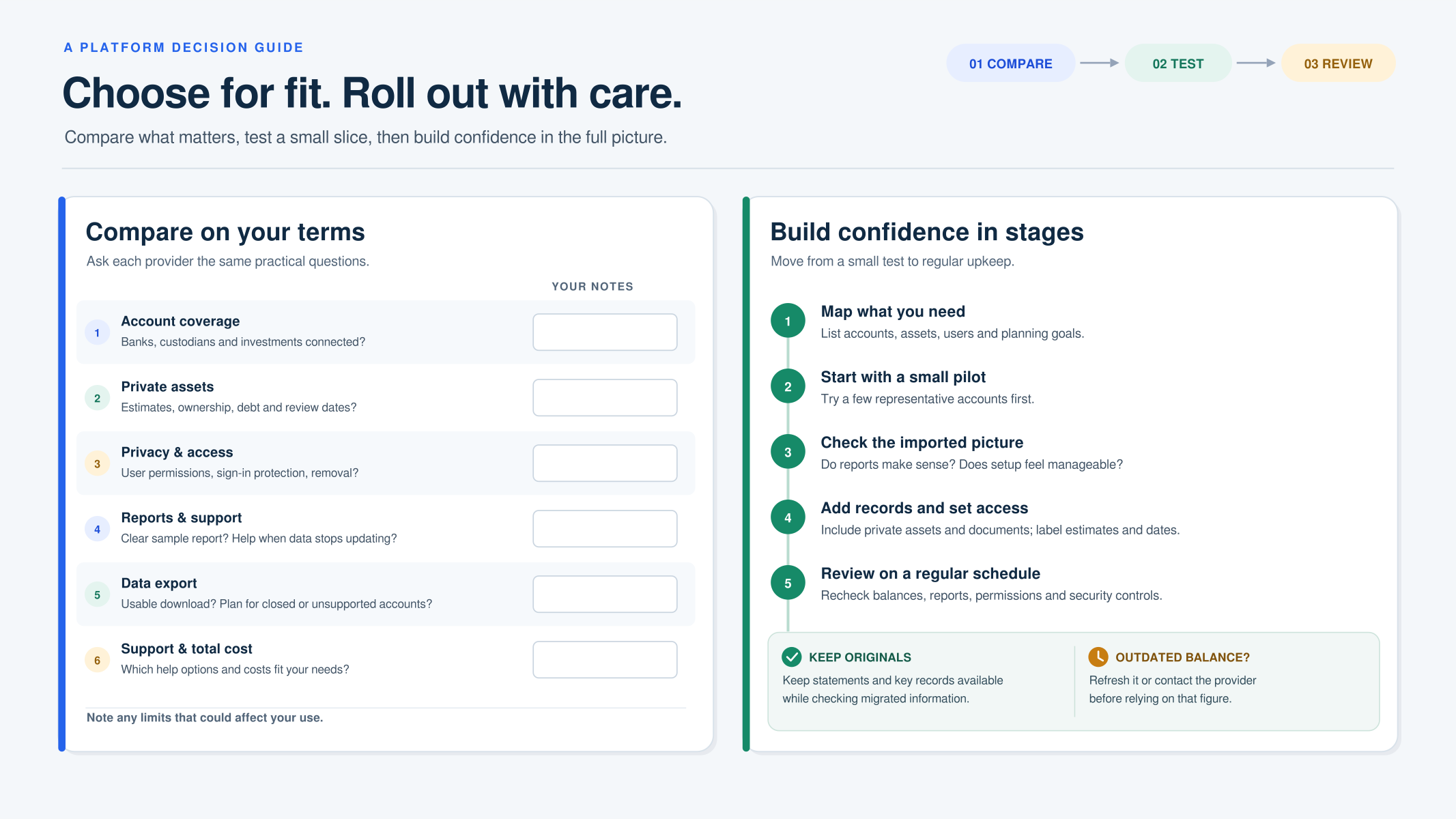
Compare platforms against your actual needs rather than choosing by feature count. Ask about account coverage, private-asset records, reporting, export options, support, and total costs. A short trial using a few representative accounts can reveal whether the reports make sense and whether the setup feels manageable.
| What to compare | Questions to ask |
|---|---|
| Account coverage | Can it connect to your banks, custodians, and investment accounts? |
| Private assets | Can you record estimates, ownership, debt, and review dates? |
| Privacy and access | Can you set user permissions, protect sign-ins, and remove access? |
| Reporting and support | Can you understand reports and reach help when data fails to update? |
Comparing Features, Integrations, and Support
Ask each provider to show how a sample report handles your real planning questions. Check whether you can download your data in a usable format and how the provider handles a closed or unsupported account. Compare support options, too; clear help with data issues can matter more than extra charts. Write down any limits that affect your use before making a decision.
Planning Setup, Data Migration, and Ongoing Use
Move in stages so you can spot errors before relying on the full picture. Follow this sequence:
- List your accounts, assets, users, and main planning goals.
- Test the platform with a small number of accounts and review the imported data.
- Add private assets and documents, marking estimates and dates clearly.
- Set access permissions and security controls for each user.
- Review balances, reports, and permissions on a regular schedule.
Keep original statements and important records available while you check migrated information. If a connection shows an outdated balance, refresh it or contact the provider before making decisions based on that figure.
Conclusion
Choosing wealth management software for high net worth individuals starts with a clear view of your needs. Decide which accounts, private assets, family members, and advisers belong in the process. Then compare how each platform handles data quality, reporting, security, and access. The best fit is the one that helps you make informed decisions with information you can understand and review.
Take your time with setup. Begin with a small group of accounts, confirm that the figures and update dates make sense, and add more information only after the first review. Keep professional advice in the loop for tax, investment, and estate decisions, and treat the software as a planning aid rather than an authority.
Once your system is in place, schedule regular checks for missing accounts, outdated asset values, and access that should change. With a careful setup and steady review, you’ll have a clearer financial picture and a more useful basis for conversations about your portfolio and family goals.
Frequently Asked Questions
Frequently Asked Questions
Can wealth management software replace a financial adviser?
How should I evaluate the security of wealth management software?
What should I prepare before setting up wealth management software?
Can wealth management software help with estate planning?
Does wealth management software provide tax advice?
How can family members use wealth management software without sharing everything?
What should I compare when choosing software for my financial situation?
How often should I review the information in wealth management software?
Sources
- The Leading Estate & Tax Planning Software for Financial …
https://www.wealth.comWealth.com provides an advisor-led estate planning platform for mass-affluent to ultra-high-net-worth clients.
- Personal Financial Planning Software For Individuals
https://www.mywealthtrace.com/how-it-works-individualsWealthTrace offers financial and retirement planning software for individuals.
- Investor.gov’s guide to asset allocation and diversification
https://www.investor.gov/introduction-investing/investing-basics/save-and-invest/asset-allocation-diversification-and-rebalancingInvestor.gov’s guide explains asset allocation, diversification, and rebalancing.
- private placement information
https://www.finra.org/investors/investing/investment-products/private-placementsFINRA’s page covers private placement investments.
- IRS tax topics directory
https://www.irs.gov/individuals/tax-topicsThe IRS directory lists tax topics for individuals.
- IRS estate tax page
https://www.irs.gov/businesses/small-businesses-self-employed/estate-taxThe IRS page provides information about estate tax.
- NIST Cybersecurity Framework
https://www.nist.gov/cyberframeworkNIST’s Cybersecurity Framework is a resource on cybersecurity.
- CISA’s password guidance
https://www.cisa.gov/secure-our-world/use-strong-passwordsCISA’s guidance covers using strong passwords.
- Federal Trade Commission’s IdentityTheft.gov
https://www.identitytheft.govIdentityTheft.gov is the Federal Trade Commission’s identity theft resource.
- The Best Wealth Management Software in 2026
https://masttro.com/insights/the-best-wealth-management-softwareMasttro’s 2026 article covers wealth management software and mentions the Altoo Wealth Platform.
- Wealth management system: 10 platforms compared for 2026
https://www.backbase.com/blog/wealth-management-systemBackbase’s article compares 10 wealth management platforms and describes software combining portfolio tracking, financial planning, and CRM tools.
- What are the best wealth management software tools for …
https://www.reddit.com/r/Rich/comments/1e5r2eh/what_are_the_best_wealth_management_softwareA Reddit post asks which wealth management software tools are best.
- Wealth Management Software
https://www.softwarereviews.com/categories/wealth-managementSoftwareReviews describes wealth management solutions as tools for managing complex financial activity through a secure online client portal.